
FiveM ESP and Aimbot Setup: Clean Profiles for RP and PvP
Step-by-step ESP, radar, and aimbot configuration for FiveM Lite and Pro—readable overlays, sane FOV, and server-aware tuning.
8 min read
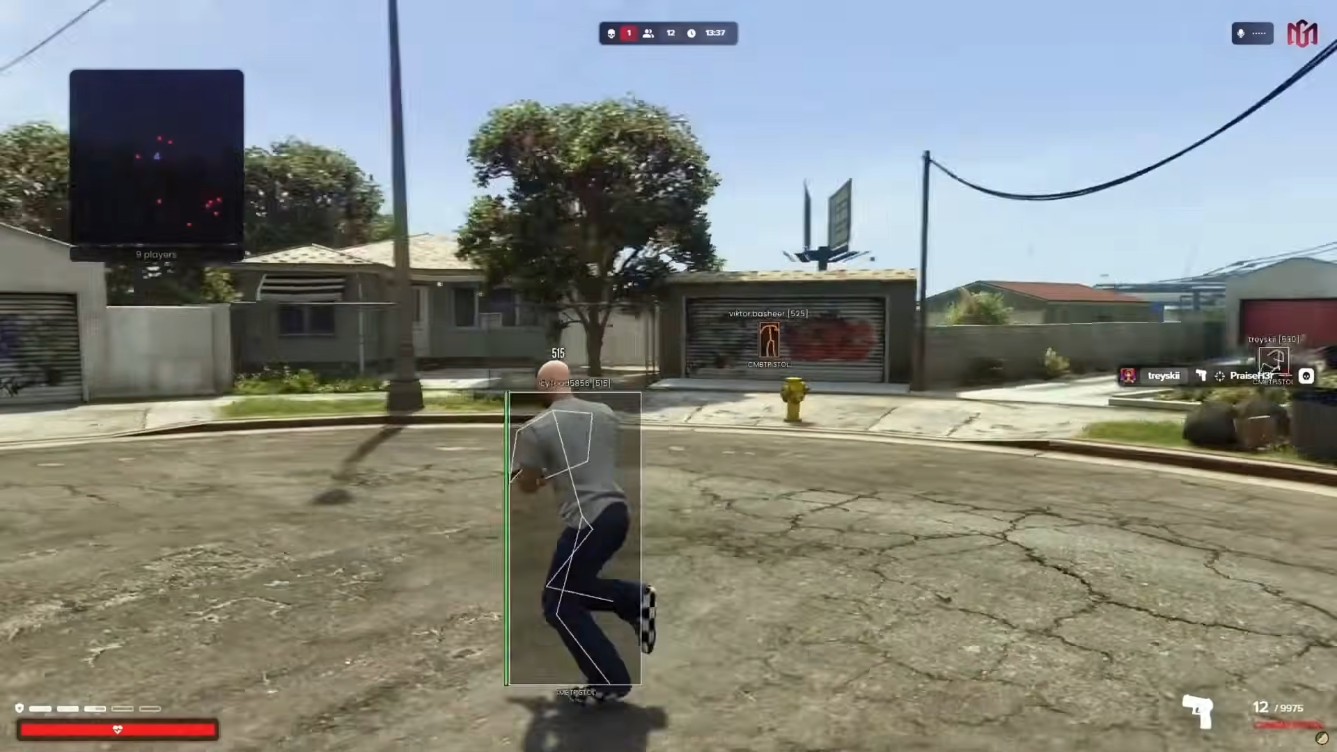
A powerful ESP and aimbot menu becomes useless when every player, vehicle, and NPC glows at maximum distance. FiveM city scenes are dense—Legion Square traffic, Vespucci beach crowds, QBCore job hubs at pillbox, ESX legacy spots at popular job centers. The goal of setup work is instant decisions: who matters, how far away they are, and whether you should engage.
This walkthrough targets FiveM Lite awareness tooling and FiveM Pro combat assists. Adjust values to your monitor, FOV, and server rules.
Baseline Lite ESP for readable awareness
Start from a blank or minimal config. Enable player ESP first—boxes or outlines, health bar, name, distance, and weapon. Set max distance to where you would actually react, not the map limit. On RP patrol, 80–120 meters often beats 300-meter walls of text.
Add the radar with moderate range and zoom. Show players; hide or mute NPCs unless you farm NPC interactions. Enable filters for admins, invisible entities, and dead bodies so scene clutter does not look like active threats.
Delay noclip, godmode, and teleport until ESP is clean. Movement cheats are louder than overlays. If you record content, toggle stream-proof overlay capture before going live.
Threat HUD and alert systems help when you tunnel on driving or menu tasks. Keep alerts concise—one colour and one sound—so they do not fight your ESP palette.
RP profile: QBCore and ESX routes
Roleplay servers punish pre-aiming and meta-gaming. Build rp-conservative:
- Muted box colour for players; NPCs disabled or very short range.
- No skeletons; optional snaplines disabled.
- Radar only, or radar plus distance text without weapon labels in civilian scenes.
- Teleport presets unused while on duty; waypoint warp disabled during active scenes.
QBCore police and EMS roles often attract admin spectate during calls. ESX job workflows expose you near shared markers—mining, fishing, trucking. ESP that highlights every player through walls invites reports even if anti-cheat stays quiet.
Pair this profile with behaviour rules from our undetected cheats guide. Technical stealth does not fix visible corner holding.
PvP profile: arenas and gang scenes
Combat servers reward faster target acquisition—not more screen paint. Build arena-rifle:
- Player ESP at medium distance with clear box outline and health staging.
- Vehicle ESP enabled if chases matter—lock status and speed only.
- Tracer visuals optional for feedback; disable if killcam clarity matters.
Switch to Pro combat tab only in this profile. Configure aimbot with a tight FOV circle that matches your monitor center. Add smoothing and reaction delay before touching silent aim. Select upper body or neck bones instead of hard head locks to reduce snap aesthetics.
Triggerbot belongs last—set a human delay and filter NPCs. Magic bullet and draw-line options are review magnets; leave them off until you understand baseline aimbot behaviour.
Vehicle and weapon pages without clutter
When enabling vehicle spawner or weapon spawner tools, keep ESP minimal. Spawning is loud; extra labels obscure exits. Use panic button bindings tested in advance so you can drop overlays if admins pop into the scene.
Online player lists—spectate, teleport, copy outfit—belong in separate profiles from RP duty configs. Accidental hotkeys cause more bans than tuned aimbot FOV.
Testing loop before mains
Run a five-minute test in a low-population area or private session:
- Spin 360 degrees—identify nearest player label in under one second.
- Drive through city traffic—radar matches visual ESP without duplicate noise.
- Fire ten controlled shots with aimbot—watch for robotic snap on killcam if available.
- Toggle panic reset—confirm overlays drop instantly.
Save the profile. Duplicate before radical changes. Elite users can import/export through the advanced config system; Lite and Pro still benefit from named slots per server.
When to upgrade tooling
If combat features are always on, confirm Pro is the right tier instead of stacking third-party tools. If you need Lua or resource inspection alongside combat, compare FiveM Elite and the Lua Executor on the products page.
Setup is never finished. Revisit distances after FOV changes, new monitors, or ultrawide resolutions. Patch days reset compatibility—verify live status before loading your favourite profile on a main account.
Clean ESP and disciplined aimbot settings outperform maximal presets every week. Build less, see more, and engage only when your profile—and the server—allow it.
Hardware and tier notes for ESP + aim
Ultrawide monitors and high FOV settings change how ESP distance caps feel — retest after any display change. Lite covers readable overlays; Pro adds aimbot, silent aim, and triggerbot with humanization sliders that matter on killcam-heavy servers.
If you want overlay rendering outside the game process, compare External Menu with Lite and Pro before stacking third-party tools that overlap the same toggles.
Cheats & products for this guide
Start with a clean Lite ESP profile, graduate to Pro when combat is daily work, and keep configs versioned per server on FiveMCheats.
FiveM cheat tiers
- FiveM Lite ESP, radar & essential mods
An entry-level FiveM cheat tier with player ESP, radar, teleport presets, noclip, godmode, and stream-proof overlays for RP and freeroam servers.
- FiveM Pro Aimbot, silent aim & combat toolkit
A combat-focused FiveM tier combining full aimbot, silent aim, triggerbot, weapon exploits, vehicle ESP, spawner tools, and online player utilities.
Standalone products
- FiveM External Menu External overlay ESP & combat
An external FiveM overlay menu with player ESP, aim assistance, vehicle tools, and stream-proof capture — designed for a lighter footprint outside the game process.
Frequently asked questions
What ESP settings should I use on strict RP servers?
Use short max distance, muted box colours, minimal snaplines, and disable skeletons unless necessary. Keep radar range tight and filter NPCs and dead players. Avoid noclip and godmode in populated scenes.
How do I set aimbot FOV for FiveM gunfights?
Start with a narrow FOV that only assists targets near your crosshair, add smoothing and reaction time, and enable bone targeting on upper body instead of head for less obvious killcam footage. Expand only after testing in private sessions.
Should I enable silent aim and magic bullet together?
Stacking silent aim, magic bullet, and triggerbot creates obvious patterns for server anti-cheat and player review. Enable one combat assist at a time while learning, and never use full combat stacks on RP mains.
How do I make ESP readable at night in GTA V?
Enable text outlines, reduce label count, and test colours against night skies and neon districts. One high-contrast player colour plus a muted NPC colour is easier to scan than a rainbow preset.
Where do I save configs after tuning?
Use the built-in save and load config slots in Lite and Pro. Name profiles by server type—rp-patrol, arena-rifle, freeroam-minimal—and export favourites if your tier supports import and export.
Related articles
GTA 5 Online vs FiveM — Why Cheats Are Different
GTA Online and FiveM use different anticheat, frameworks, and server rules. Learn why FiveMCheats is built for FiveM — and what transfers from single-player habits.
FiveM Lua Executor Guide: Safe Workflows for Scripts and Events
How to use FiveM Lua executors responsibly—runtime basics, QBCore and ESX events, Elite tooling, and config hygiene.